thats by our co-worker nerd Stevan Agne. Arg, no text there. just pictures. but the dog is nice, a picture of Lilli.
funny typo
we want to fill Eric Miller’s piggy bank:
On the ISWC2005 i just saw this funny typo in the slides of a talk: calulate instead of calculate
iPod nano installieren
nun, heute ist es endlich soweit: Ingrid hat ihren neuen Schatz bekommen, einen iPod nano, der von uns auf den Namen “Eve” getauft wurde.
ipod nano info: wikipedia.de |wikipedia en |apple
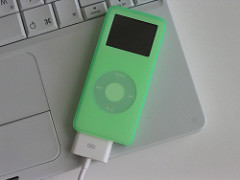
der ist so grün, weil er in eine grüne nano-tube gestöpselt ist.
beim installieren sollte man darauf achten, dass wir ja windows und MacOS parallel verwenden. Dann ist es sinnvoll, zuerst den iPod an die Windows kiste zu hängen, damit diese das Dateisystem mit Fat32 formatiert. Mit HFS ist halt nix mit MemoryStick Funktion, kann ja keiner lesen.
wie das genau geht (wenn mans zuerst am apple anschliesst, so wie wir) steht in diesem tutorial.
Das heißt: zuerst iPod Software unter Windows installieren danach iPod anschliessen, dann iTunes am besten unter Windows wieder deinstallieren oder zumindest das ganze Taskbar zeug wegmachen. Dabei hilft einem der nützliche Autostart configuration wekrzeug von Microsoft, das alle programme findet die sich anfangs starten (also auch den nervigen quicktime): einfach windows+r und “msconfig” ausführen.
visualisierung
kam gerade von heimwege
schau dir das mal an. Evtl ist das von Interesse für eine Visualisierung großer Datenmengen in Gnowsis:
http://www.visualcomplexity.com/vc/
Social Community visualisation am Beispiel von Flickr:
französisch
Du kannst zwar einen Franzosen aus Frankreich heraus holen, aber nicht Frankreich aus einem Franzosen
erklärung folgt später
netcache
The Great Escape 1.0 Nachlese
yesterday we had our first “upgrade kaiserslautern” event
ceur-ws.org
A website that offers free (as in beer) publishing of workshop proceedings. Only online material. Their service: publish it on a website under a nice name. Aachen, Germany based university organization.
The Great Escape 1.0 / Pixelflucht im Glockencafe
link

Am 5.10.2005 wird die Digitalcouch im
Glockencafe die öffentliche Veranstaltungsreihe TheGreatEscape / Pixelflucht eröffnen. Damit gehts raus aus dem Wohnzimmer und rein in den öffentlichen Raum. Inhaltlich gehts wie gehabt um Hype, Bits, Media, Kunst, Freude am Leben.
Eintreffen 20:00
Vortrag 21:00
Zielpublikum: wer bereits die digitalen Fluchten aus der realen und gedanklichen Enge der Stadt in seinen Alltag integriert hat, sollte hier fündig werden, viel Gleichgesinnte bei realem Bier.
Moderation: Leo, unser Quotenwiener.
Inhalt:
- Digital Media
- Michel Gondry’s Bildsprache
- Projekt SilverFire – flucht durch Videokonferenz
- Kritisieren und Lieben – Postkarten aus Kaiserslautern
goodTunes
great article about making your own private radio station using iTunes.
a translation of this article
have to try this out (after looking at all those internet phenomena of yesterday)